It’s a classic RV headache: you’ve just dumped the black tank, but the panel insists it's still full. If your RV tank monitor reads wrong, you can almost always bet the culprit is gunk, toilet paper, or other residue building up on those old-school internal sensors. It creates a false connection, making the system think the tank is full when it's completely empty. This guide provides actionable steps to diagnose and fix the issue, moving from simple cleaning to a permanent upgrade.
Why Your RV Tank Monitor Is Lying to You

If you feel like your RV’s tank monitor has a mind of its own, you’re not imagining things. This isn't just a random glitch; it's a known design flaw in the outdated technology used in most RVs.
The whole problem boils down to the factory-installed probe-based sensors. This technology has been the industry standard for decades, and its design is surprisingly basic. A few small metal probes are drilled through the side of your holding tanks at different heights, usually marking the 1/3, 2/3, and Full levels.
How the Faulty System Works
The system is a simple electrical circuit. A tiny bit of voltage is sent to the probes, and the water or waste in your tank acts as a conductor. When the liquid level rises and touches a probe, it completes the circuit with a "ground" probe at the bottom of the tank. That connection is what lights up the corresponding LED on your monitor panel.
In a brand-new, perfectly clean tank, it works great. But in the real world of RVing, especially in black and gray tanks, it fails miserably.
The core issue isn't that your monitor is broken. The problem is that the internal sensors are designed in a way that makes them incredibly easy to foul. Anything that can conduct a little electricity and bridge the gap between two probes will trigger a false reading.
This has been a thorn in the side of RVers for decades. A 2026 RV Industry Association (RVIA) survey of over 5,000 owners found that 78% reported frequent inaccuracies with their black and gray tank monitors. For 42% of those people, it led to messy overfilled tanks.
The Real Culprits Behind False Readings
So, what exactly is causing these sensors to lie? It all comes down to the gunk that inevitably builds up inside the tanks.
- Black Tanks: The number one offender is wet toilet paper or solid waste that gets stuck on the probes. Even after a thorough dump and rinse, this debris can hang down, stay wet, and keep that electrical circuit complete.
- Gray Tanks: Grease from cooking, soap scum, and oils from your shower create a slimy film that coats the tank walls and sensors. That film traps moisture and creates a perfect conductive path, tricking the system into thinking the tank is fuller than it is.
- Mineral Buildup: If you often camp in areas with hard water, calcium and other mineral deposits can cake onto the sensors over time. This creates a permanent, rock-hard bridge that even the best tank cleaners can't remove.
At the end of the day, your RV tank monitor reads wrong because the system simply can't tell the difference between actual water and conductive gunk. If you want to get a better handle on how all these parts work together, you can learn more about the complete RV tank monitoring system.
How to Pinpoint the Real Problem

Before you start ordering parts, work from the easiest potential fixes to the most complex. Is it just a dirty sensor, or do you have a bigger electrical gremlin on your hands? Let's walk through the process to find the real source of the trouble.
Step 1: Start With a Simple Visual Inspection
Your first move doesn't require any fancy tools. Just grab a good flashlight and get ready to crawl under your rig for a quick look. The holding tanks are usually pretty easy to spot from the underbelly, often hanging out near your dump valves.
Focus your light on the sides of the tanks where the sensor wires are attached. Each probe will have a wire leading to it, typically held on by a small nut or a spade connector. You’re looking for the obvious red flags that can mess with the electrical signal.
- Corrosion: Look for any rust or that tell-tale greenish-white crud on the wire terminals and nuts. This gunk is an expert at blocking the weak electrical signal these systems use.
- Frayed or Broken Wires: Check for wires that are cracked, look like they’ve been chewed by a critter, or have simply pulled loose. Any break in the wire means an instant failure.
- Loose Connections: Give each wire a gentle wiggle right at the connection point. A nut that has vibrated loose or a connector that’s not fully seated can cause those frustratingly intermittent readings.
More often than not, a quick cleanup of a corroded terminal with a wire brush or tightening a loose nut is all it takes. If everything looks clean and snug, it's time to break out the multimeter.
Step 2: Use a Multimeter to Test Your Wiring
If a visual once-over doesn't solve the mystery, your multimeter becomes your best friend. This little gadget lets you test for continuity, which is just a fancy way of saying you’re checking if the wire is intact from end to end. You can pick up an inexpensive multimeter at any auto parts or hardware store.
A continuity test is how you figure out if the problem is in the wiring itself or with the sensor probes inside the tank. It tells you if the electrical signal has a clear path from the tank all the way back to your monitor panel.
To run the test, switch your multimeter to the continuity setting—it’s the one that usually has a symbol that looks like a sound wave. Find the wire for the sensor you think is acting up and disconnect it from the probe on the tank.
Touch one of your multimeter leads to the end of that disconnected wire. Now, touch the other lead to the corresponding terminal on the back of your monitor panel. If you hear a beep, you have continuity. The wire is good.
No beep? That confirms a break somewhere in that specific wire. Now you just have to trace it to find the damaged spot. This simple test is a game-changer for isolating the issue without guessing. If all your wires beep, then the problem is most likely the sensors themselves or the monitor panel.
Troubleshooting Common RV Tank Monitor Issues
| Symptom | Likely Cause | Recommended First Action |
|---|---|---|
| Reads Full (or Partially Full) After Dumping | Sensor Buildup | Deep clean the tank with a high-pressure wand or chemical soak. |
| All Lights On, Or No Lights At All | Bad Ground Wire | Locate the common ground wire on the frame, clean all contact points, and re-secure it. |
| Reads Empty All The Time | Broken Sensor Wire or Failed Sensor | Inspect wiring for breaks or corrosion. If wiring is good, perform a bypass test to check the sensor. |
| Readings are Erratic or Inconsistent | Failing Monitor Panel or Loose Wiring | Check all wiring connections first. If the problem persists across multiple tanks, the panel may be faulty. |
This table should point you in the right direction, but let's dive into the step-by-step fixes for these common culprits.
Actionable Fix #1: Cleaning Fouled Sensors The Right Way
If your diagnosis points to gunk on the sensors—and it usually does—you've got a few ways to tackle it. The mission is simple: break up whatever toilet paper, grease, or sludge is stuck to the probes and creating that false reading.
- High-Pressure Tank Wands: This is a must-have tool for any RVer. A tank wand connects to a hose and lets you blast a powerful, targeted jet of water inside your tanks. It’s hands-down the most effective method for breaking loose stubborn residue from the walls and sensors, especially in the black tank.
- Chemical Soaks: There are tons of products out there designed to dissolve waste. For the best shot at success, use an enzyme-based or caustic cleaner. Fill the tank to the top with water, add the chemical, and let it soak for a good 24-48 hours. This works wonders when you’re parked at a full-hookup site and have some time.
- The "Ice Cube Method": You've probably heard of this one. The idea is to dump a bag or two of ice and some water into the tank right before hitting the road. As you drive, the sloshing ice is supposed to scrub the inside. While it can help with minor slime in a gray tank, it’s rarely aggressive enough for the caked-on gunk in a black tank. Think of it as a low-cost first try, not a guaranteed fix.
For a deeper dive into all the different cleaning methods, check out our complete guide on how to clean RV holding tanks.
Pro Tip: After you deep clean a tank, always add a few gallons of fresh water back in along with a quality tank treatment. This creates a "primer" that helps prevent solids from sticking to a dry tank bottom and gets the treatment working right away.
Actionable Fix #2: Hunting Down a Bad Ground Wire
If a squeaky-clean tank doesn't solve it, your next suspect is a bad ground wire. The entire sensor system—black, gray, and fresh—shares a single ground wire to complete its electrical circuit. When that one connection gets loose, corroded, or breaks, the whole system goes haywire. Often, this results in all the lights on your monitor panel staying lit or, conversely, none of them lighting up at all.
Your mission is to find that wire. Look for a single wire attached directly to your RV's metal frame somewhere near the holding tanks. It’s usually a white wire, but don't count on it.
Once you find it, remove the screw or bolt holding it down. Take a wire brush or a piece of sandpaper and scrub the wire’s terminal ring, the screw, and the contact point on the frame until you see shiny, bare metal. Re-attach it tightly, and you might be pleasantly surprised to find your problem is completely gone.
Actionable Fix #3: Calibrating and Identifying a Failing Panel
If your tanks are spotless and the wiring is solid, but the readings are still nonsense, the monitor panel itself can fail or fall out of calibration. This is less common, but it does happen.
Some higher-end monitor systems have a small adjustment screw on the back of the panel for calibration. This lets you fine-tune the sensitivity, but I’d strongly recommend digging out your RV’s manual before you start turning things. Making random adjustments can make things worse.
If you’ve ruled out everything else and only one tank is reading incorrectly, or the lights are flickering erratically across all tanks, it could be a sign that the monitor panel's circuit board is on its last legs. At that point, a replacement is your most practical option.
Should You Clean, Repair, or Replace Your Sensors?
After you’ve poked around and figured out what’s causing your tank monitor headaches, you’ve hit a crossroads. Now you have to decide if a quick fix will do the trick or if it’s finally time to stop fighting a losing battle with those notoriously finicky factory sensors.
When to Repair and When to Give Up
For most RVers, a simple repair is the logical first move. Fixing a corroded ground wire or patching up a single broken sensor wire is a cheap and easy DIY job that can get your system back online.
The real trouble starts with the sensors themselves. If you feel like you’re constantly battling fouled probes in your black or gray tank, you’re stuck in a cycle of cleaning that just doesn't pay off. If your RV tank monitor reads wrong just a few trips after you gave it a thorough cleaning, you're looking at a recurring nightmare.
This decision tree gives you a good visual for tracking down the problem, from a simple misreading to a completely dead panel.

As the flowchart shows, cleaning is often the first step for a misreading sensor. But a blank panel? That almost always points to an electrical issue like a bad ground. When you're thinking about how to clean your sensors, looking at the methods used for professional water tank cleaning can give you some great ideas on how to get rid of stubborn residue effectively.
The Cost of Inaccurate Sensors
Ignoring persistent sensor failures can lead to nasty consequences. Black tank overfills are not only disgusting but can be expensive. A sewage backup can cost anywhere from $400 to $1,200 for a professional cleanup. You can discover more insights about these common RV issues and the real financial hit they can cause.
The clearest sign it's time for a replacement is when the effort you're putting into cleaning outweighs the benefit of a temporarily accurate reading. If you've cleaned the sensors multiple times with little to no lasting effect, you're just throwing good time after bad.
Ultimately, you have to weigh the short-term cost of a new system against the long-term frustration and the risk of a very costly mess. An external sensor system is an investment in peace of mind.
If you're tired of the constant battle, a full replacement is the only permanent fix. For more tips on keeping your sensors in working order, check out our guide on RV black tank sensor cleaning.
The Ultimate Fix: Upgrading Your Tank Monitor System

If you’re fed up with the endless cycle of cleaning, testing, and still second-guessing your tank levels, it’s time to stop treating the symptom and finally cure the disease. The single most reliable way to get accurate tank readings is to upgrade the entire monitoring system.
This isn't just another repair—it's a permanent solution. By moving away from the factory-installed internal probes, you get rid of the core problem once and for all. For any RVer who values peace of mind, especially if you spend a lot of time boondocking, it's a massive quality-of-life upgrade.
The Power of External Sensors
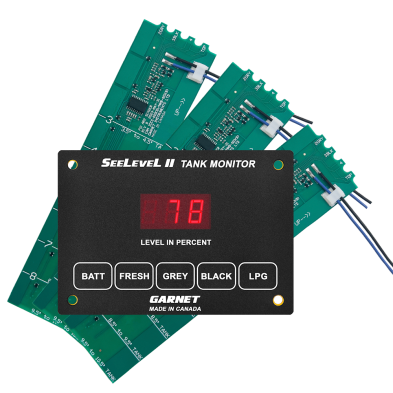
The tech that makes this possible is brilliant. Systems like the very popular SeeLevel II from Garnet Instruments don't use any probes inside your tanks. Instead, they use flexible sensor strips that you stick right onto the outside of your black, gray, and fresh water tanks.
Because these sensors never touch waste, grease, or toilet paper, they can't get fouled. It's that simple. They read the fluid level through the tank wall and give you a precise measurement as a percentage (like 65% full) instead of the vague and often wrong 1/3, 2/3, and Full lights.
Upgrading to an external sensor system is the only way to get truly reliable, stress-free tank readings. It takes the measuring device out of the hostile environment inside the tank, putting a permanent end to false readings caused by gunk and buildup.
A Manageable DIY Project
Installing a system like the SeeLevel II is a project most owners can handle themselves. You don't need to be a master technician, just have a bit of patience and be able to get to your holding tanks.
The basic steps are pretty straightforward:
- Access your tanks: You'll need to get to a flat, vertical spot on each tank. This is often the most challenging part and may require removing an underbelly panel.
- Clean the surface and stick on the sensors: After a quick clean with an alcohol wipe, the self-adhesive sensor strips are pressed firmly into place.
- Wire up the display: You'll pull out the old monitor panel and wire in the new, modern display, connecting it to the new sensors and a 12V power source.
Most kits come with excellent instructions. For a few hours of work, you get consistently accurate readings for years. It's a weekend project that pays you back with confidence on every single trip.
Frequently Asked Questions About RV Tank Monitors
Here are some quick answers to the most common questions about faulty tank monitors.
Why Does My Black Tank Always Read Full After Dumping?
This is the classic sign of “sensor fouling.” It's incredibly common. Even after you’ve dumped the tank, bits of toilet paper and sludge can cling to the internal sensor probes. That wet residue completes the electrical circuit, fooling the monitor into thinking the tank is still full.
Your first line of attack should always be a thorough cleaning, either with a high-pressure tank wand or a strong chemical cleaner. If the problem comes right back, you’re likely dealing with stubborn, layered gunk that a simple rinse won't touch, and it might be time to think about a permanent upgrade.
Is the Ice Cube Method for Cleaning Sensors a Myth?
It’s not a complete myth, but its effectiveness is often blown way out of proportion. The idea is that tossing a few bags of ice into the tank before you drive will create a sloshing action that knocks debris off the sensors. For minor slime in a gray tank, it can sometimes work.
But for the caked-on, stubborn gunk you find in a black tank? It rarely has enough power. Give it a shot—it's cheap and easy—but don't be surprised when it doesn't solve a persistent problem where an RV tank monitor reads wrong. A dedicated tank wand is a much more reliable tool for the job.
Is Upgrading to a SeeLevel II System Actually Worth It?
For anyone who camps full-time, boondocks regularly, or just wants to end tank-level anxiety for good, the answer is a resounding yes. There's a reason it's one of the most popular upgrades in the RV world.
If you've ever had to cut a trip short or found yourself worrying about an overflowing tank, the investment pays for itself in peace of mind. You shift from guessing between 1/3, 2/3, and Full to knowing with absolute certainty that you have exactly 28% fresh water left. It’s a game-changer.
Systems like the SeeLevel II use external sensors mounted on the outside of the tanks. Because they never come into contact with the waste, it’s impossible for them to get fouled up. They just work.
My Fresh Water Tank Reads Empty, but It's Full. What’s Wrong?
Unlike your waste tanks, sensor fouling is almost unheard of in a fresh water tank. When a fresh water gauge acts up, the problem is nearly always electrical.
Start by taking a close look at the sensor wires on the outside of your fresh water tank. You’re looking for a spade connector that has wiggled loose, a broken wire, or any visible corrosion on the terminals. More often than not, simply cleaning the connection points with a wire brush or crimping a loose connector back on will fix it instantly. If all the wiring looks pristine, the sensor probe itself has likely failed and will need to be replaced.
No matter what parts or accessories you need to get your RV ready for the road, RVupgrades.com has you covered with over 20,000 products in stock and expert support. Explore our full catalog and get back to confident camping.